
Most females nowadays possess a Boots Advantage Card. They use it for every little purchase they make in Boots stores, whether it be whilst paying for their lunch, those little essentials or splashing out on a big treat. But how many of you that currently have an Advantage Card use it to its full potential?
I have two words for you.
You’ve probably heard those words bandied around blogs, social networks and the like – possibly even your local Boots store.
But how much do you understand about the concept?
Boots Treat Street is designed to benefit those of you who love to shop online. You can collect Advantage Card points on a variety of items on a variety of different websites and online shops.
Are you a film & DVD geek? Collect points on your Play.com purchases!
Do you love an auction? Earn some points whilst perusing Ebay!
Are you a mum, and need yours & baby’s little essentials? Stock up whilst earning Boots points at Mothercare!
Plenty of big name brands have joined the Boots Treat Street venture, including brands such as Laura Ashley, Dorothy Perkins, Early Learning Centre, Evans, H Samuel, Halfords and HMV to name but a few.
I always tend to go through Treat Street if planning to make a purchase from any of the above online shops, but when I’ve mentioned it to some people, they’re completely oblivious to how it works and what to do. Hence why I have created this quick four step guide to navigating yourself round Boots Treat Street.
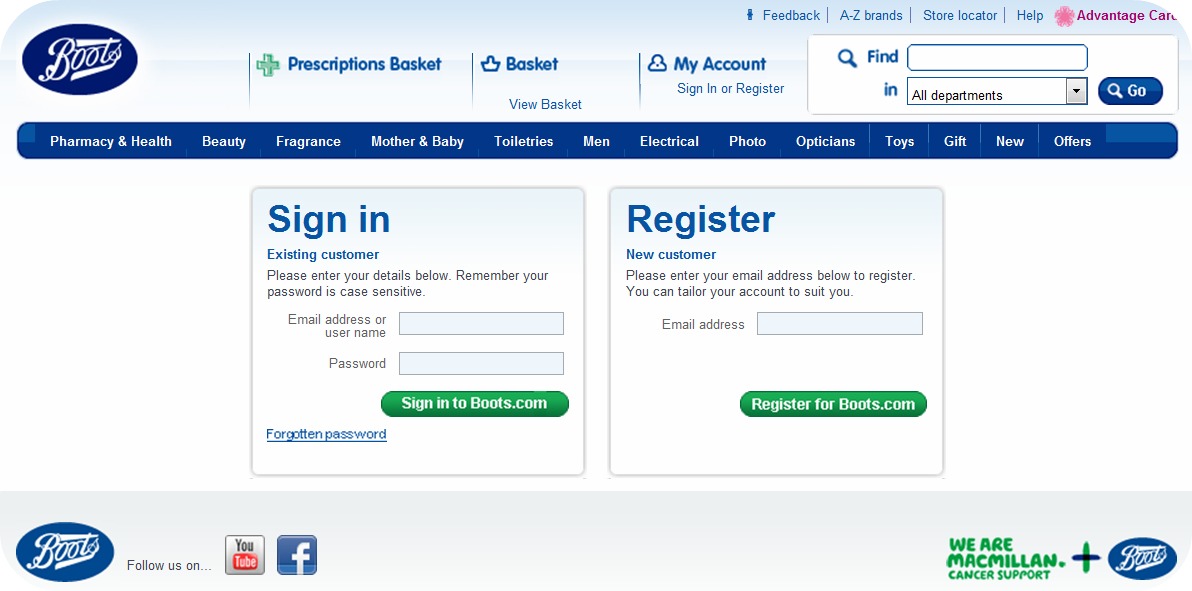
1. Log on to the Boots.com website.
 |
| Click picture for larger image |
If you do not already have an online account with the Boots website, then just register on the right hand side and edit your profile with your Advantage Card details and you’re good to go!
Lets just assume you already have an online account with the Boots website for the purpose of this post, though. Sign in with your account details on the left hand side.
2. Once logged in, hover your mouse over the Offers button where you should find Treat Street under the Advantage Card offers.
 |
| Click picture for larger image |
Once you click on offers, and onto the Treat Street offer you will be taken to the Treat Street homepage. Providing you logged in on the website in the first step, you shouldn’t have to submit your details again.
3. You’ll find yourself on the Treat Street homepage. Click on A-Z of shops.
 |
| Click picture for larger image |
This gives you an idea of the amount of companies Boots are working with. This is where you choose the shop that you wish to browse or purchase from.
4. Click on the shop you wish to go to, and you shall be taken to a page like this:
 |
| Click picture for larger image |
For the purpose of this post, I used play.com as I often buy stuff from their website, so it seemed apt.
Above you will see the Play logo and a little button underneath saying Shop Now. To the right, there is a section with the different categories, which take you straight to your category of choice on the Play website, rather than the main page.
Also, at the bottom are the current offers going on at Play, or offers from Treat Street in partnership with Play, such as a points bonanza.
This is where you choose whether you want to go to the main homepage, to a specific category or whether you want to take advantage of the current offers. To be directed to the website, just click on any of the Shop Now buttons.
This is the same for all the shops on the website 🙂
I must explain also that you do only earn 1 point per £1 on Treat Street purchases (unless there is a specific points offer going on), however if you’re always buying stuff online (like me), this is definitely worth checking out! Watch your points build up in no time at all 🙂
I hope this post has helped those of you who didn’t understand before, to understand the concept a little better.
If you have any questions, please don’t hesitate to ask me them – just leave the question in the comments, and I’ll reply as soon as possible!
xo
This is NOT a sponsored post, and I am in no way affiliated with the Boots.com website or the Treat Street programme. I simply think this is a brilliant concept, and wish to help the rest of you benefit from your online shopping – why not earn a little something back?
Thanks for this! I get it now. x hivenn
You're welcome!
Glad it helped 🙂
xo
Thanks that was helpful x
Glad to hear it 🙂
This post has been in the pipeline for a while – a few of my friends couldn't grasp how to work it, so I said I'd write a simple guide for them, and then I realised it could be useful on the blog 🙂 xo